Nuestro RDM sitio web está disponible en español!
Ciudad de Redmond, Oregón – Roberts Field, Aeropuerto Municipal de Redmond
Redmond Municipal Airport (RDM) is committed to providing a welcoming and accessible experience for all travelers.
WHEELCHAIR SERVICE
If you require wheelchair or mobility assistance from the airline ticket counter through security, to or from the gate, or to/from the aircraft, please arrange these services directly with your airline in advance.
Airline-Provided Wheelchair Assistance
If you require wheelchair assistance from the ticket counter through security, to/from the gate or aircraft, please arrange these services directly with your airline in advance. You can do this by:
- Visiting your airline’s website
- Calling their reservations or customer service number
- Requesting assistance during the online check-in process (if available)
- Speaking with an airline representative at the ticket counter
Alaska
(800) 503-0101 (dial 711 for relay services)
Alaska Airlines accessibility travel information
American Airlines
(800) 237-7976 – For hearing or speech-impaired call
(800) 735-2988 – Baggage Information
American Airlines accessibility travel information
Breeze Airways
(501) 273-3931 text only
Breeze Airways accessibility travel information
Delta
(404) 209-3434 (dial 711 for relay services)
Delta accessibility travel information
United
(800) 228-2744
United accessibility travel information
Complimentary, self‑service wheelchairs are available in the main terminal on a first‑come, first‑served basis. These wheelchairs are intended for short-distance use within the public areas of the terminal. Airline-provided wheelchair assistance may be required to move through security and to the gate.
AIRPORT PARKING & CURBSIDE ASSISTANCE
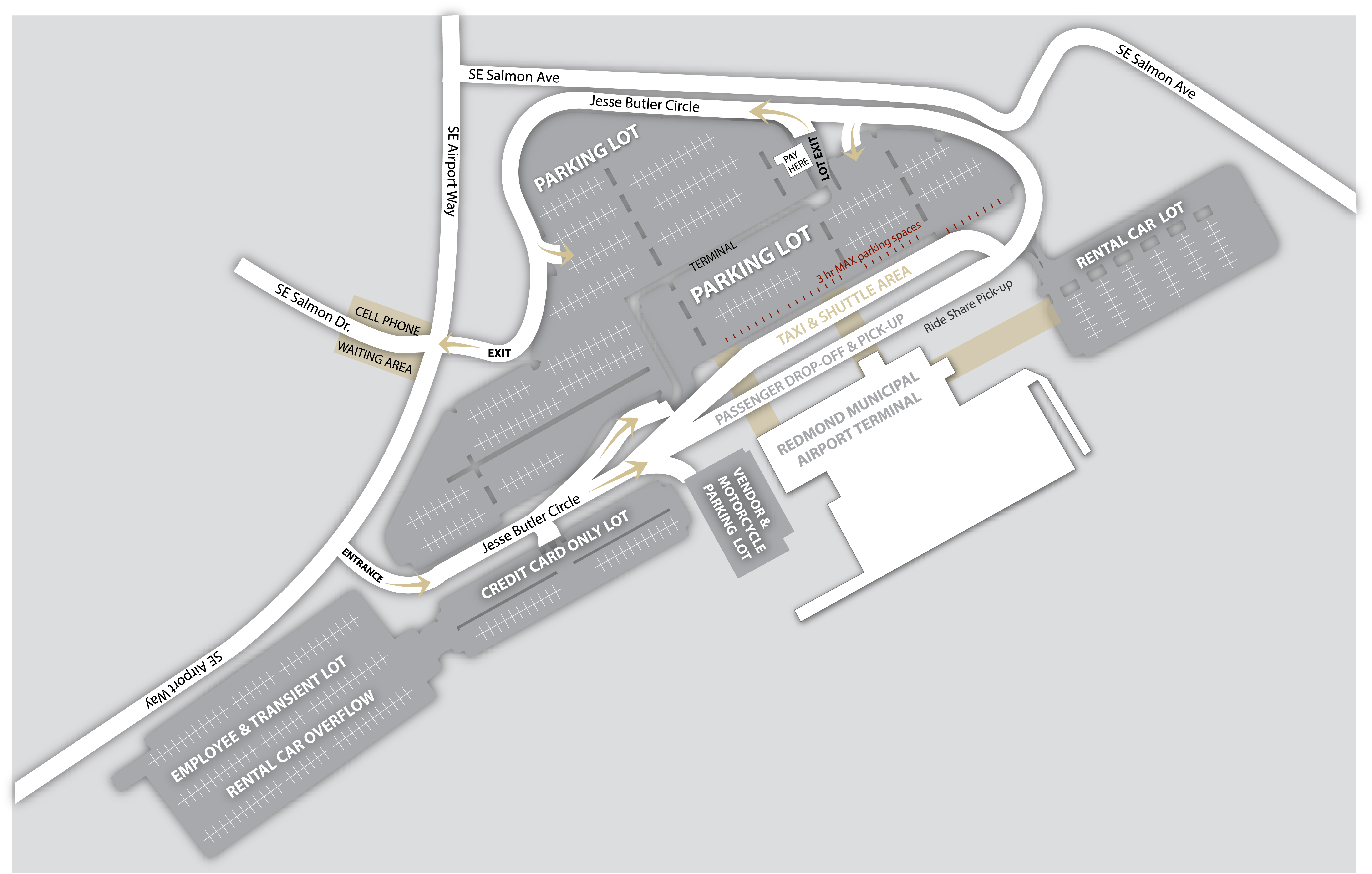
ADA-designated parking spaces are available in all Airport Paid Parking Lots for vehicles displaying valid disabled permit identification. Standard posted parking rates apply.
All routes from all parking areas to the terminal is barrier-free and on a single level, ensuring accessible travel for all passengers.
Please note that RDM staff cannot provide assistance between the curb and the airline ticket counter. Travelers who require curb‑to‑counter support should plan to arrive with a companion who can help during this portion of the trip. Airline personnel provide wheelchair and mobility assistance beginning at the ticket counter, continuing through security, to the gate, and upon arrival at baggage claim.
Airport Parking Map
RENTAL CARS
For wheelchair or mobility assistance related to your rental car, please contact your rental car company directly. Assistance availability varies by agency.
Rental Car Agency Contact Information
ALAMO
Reservations: (800) 462‑5266
Terminal Counter: 541‑504‑2824
AVIS
Reservations: (800) 331‑7423
Terminal Counter: 541‑923‑3750
BUDGET
Reservations: (800) 527‑7000
Terminal Counter: 541‑923‑0699
ENTERPRISE
Reservations: (800) 736‑8227
Terminal Counter: 541‑504‑2824
HERTZ
Reservations: (800) 654‑3131
Terminal Counter: 541‑923‑1411
NATIONAL
Reservations: (800) CAR‑RENT
Terminal Counter: 541‑504‑2824
TSA CARES
TSA Cares is a dedicated helpline that provides travelers with disabilities, medical conditions, or other special circumstances with additional support during the airport security screening process.
What TSA Cares Provides
A TSA Passenger Support Specialist can assist you during screening, answer questions about the process, and help ensure a smooth experience through the security checkpoint.
How to Request Assistance
Travelers are encouraged to contact TSA Cares at least 72 hours before travel to request support.
Contact TSA Cares
Phone: 1‑855‑787‑2227
Monday–Friday: 8 a.m. to 11 p.m. ET
Weekends/Holidays: 9 a.m. to 8 p.m. ET
Learn more or submit an online request:
Request for TSA Cares Assistance | Transportation Security Administration
RESTROOMS
All restrooms in the airport terminal are ADA compliant and include:
• Larger accessible stalls
• Grip handles
• Changing tables in all men’s and women’s restrooms
Public‑Side Restrooms (Before Security)
Accessible restrooms are available:
• East entrance (near baggage claim)
• West entrance of the terminal
Post‑Security Restrooms (Hold Room)
Accessible restrooms are available on both levels:
• 1st floor hold room – next to the family restroom and nursing room
• 2nd floor hold room – adjacent to the family restroom
Family/Companion Restrooms
Located next to the main restrooms on the public side and provide additional space for caregivers or travelers needing privacy.
Nursing Room
A private nursing room is located past TSA on the 1st floor, next to the restrooms and family restroom
SERVICE AND EMOTIONAL SUPPORT ANIMALS
Animals Allowed in the Airport
The following animals are permitted inside the terminal (must remain on a leash):
- ADA‑recognized service animals
- Emotional Support Animals
- Police K‑9s
Air Travel with Service Animals
Airline policies for traveling with service animals vary by carrier.
Travelers should check directly with their airline for:
- Required documentation
- Advance notice requirements
- Breed or species restrictions
- Check‑in procedures
- Any forms that must be submitted before arrival
Please review your airline’s service‑animal travel requirements before your trip.
All Other Animals
All other animals, including pets traveling as cargo or pets in the cabin, must remain in a kennel or carrier in all areas of the airport.
Related Policies & Information
Department of Transportation Rules for Emotional Support Animals
Airport Terminal Animal Provisions
City of Redmond Service Animals for People with Disabilities policy
UNACCOMPANING MINORS OR TRAVELERS WITH SPECIAL NEEDS
To accompany a minor or traveler with special needs to or from a departure or arrival gate (such as an unaccompanied child or an elderly or disabled passenger), you must obtain a gate pass at the airline ticket counter which the passenger is flying. Gate passes are issued solely at the discretion of the airline, and not all airlines issue a gate pass. Please verify your airline’s policy prior to your trip to the airport.
Be sure to allow additional time for potential lines at the ticket counter and check with the airline in advance to make sure the ticket counter will be open when requesting a gate pass for an arriving flight. Be prepared to provide government-issued photo identification (e.g. driver’s license) and flight information. Only one person may be allowed to accompany a passenger to or from the gate.
SUNFLOWER LANYARD PROGRAM
About the Sunflower Program
To better support travelers with disabilities that may not be immediately visible, RDM participates in the Hidden Disabilities Sunflower Program. This program is recognized at more than 30 airports worldwide.
Travelers who choose to wear a sunflower lanyard are signaling that they may need a little extra time, patience, or assistance.
Where to Get a Sunflower Lanyard
Lanyards, pins, and supporter materials are available at:
• Airport Administration Office
• Visit Central Oregon kiosk (located in Baggage Claim)
What Are “Hidden Disabilities”?
Some disabilities are visible, such as the use of a mobility device.
Other disabilities may be less apparent, including:
• Autism
• Crohn’s disease
• Dementia
• Hearing impairments
• Multiple sclerosis
• PTSD
• Chronic pain
• Anxiety-related conditions
• Other non-visible medical conditions
Wearing a sunflower lanyard is always optional.

For general accessibility inquiries, please contact us at [email protected] or call 541-504-3499 Monday – Friday between 8 am – 4 pm, closed on Federal Holidays.
Please note that RDM staff cannot provide assistance between the curb and the airline ticket counter. Travelers who require curb‑to‑counter support should plan to arrive with a companion who can help during this portion of the trip. Airline personnel provide wheelchair and mobility assistance beginning at the ticket counter, continuing through security, to the gate, and upon arrival at baggage claim.
TRAVELING WITH YOUR OWN WHEELCHAIR OR OTHER MOBILITY DEVICE
Policies vary from airline to airline regarding mobility devices in general. To learn more about your airline’s procedures and requirements for mobility devices, please visit your airline’s website or call their reservation desk.
If you are a passenger with a disability and you will be traveling with your mobility device, here are a few suggestions to make your airport experience trouble-free and more enjoyable:
When making airline reservations AND checking in for your flight, advise your airline of the following information:
- Type of mobility device
- Please note that Segway mobility devices are not authorized to be stored on most carriers.
- Weight and size of mobility device
- Whether or not your mobility device will require assembly/disassembly
- Whether or not you are non-ambulatory, and will need an onboard wheelchair to reach your seat when boarding or deplaning the aircraft.
- Whether or not you can ascend and descend stairs without assistance
- Whether or not you will be checking your mobility device at the ticket counter, or at the departure gate.
Allow extra time when traveling with a battery-powered electric wheelchair, cart, or scooter:
- Although not required, it is recommended that you check in at your airline ticket counter at least 2 hours in advance; and,
- Arrive at your departure gate at least one hour prior to your scheduled departure.
Attach instructions to your wheelchair if assembly/disassembly is needed:
- Although not required, it’s very helpful to airline staff if you attach a copy of assembly/disassembly instructions to your wheelchair (or another mobility device); and, if needed, bring specialized tools with you when traveling. (If you have questions regarding permitted carry-on tools, please contact the Transportation Security Administration at 1-866-289-9673.)
Identify battery type and know how to access it, if your mobility device is battery-powered:
- Please let the airline staff know your wheelchair’s (or other mobility device’s) specific battery type, and identify the battery as either spillable or non-spillable so that airline staff can adhere to federal “dangerous goods” handling procedures.
- Before arriving at the airport, it is best if you can educate yourself on how to gain access to the battery compartment and bring a specialized tool if needed.
- Some mobility devices have batteries that can only be accessed by a technician. If this is the case, you may not be able to fly with your mobility device. Check with your air carrier to be sure.
Folding wheelchairs
If space is available, many airlines will allow folding wheelchairs to be stowed in the cabin on a first-ask, first-serve basis. If cabin storage is not available, airlines will typically allow you to check your wheelchair as baggage at either the ticket counter or the departure gate. Your airline will provide a wheelchair and wheelchair aid to assist you to your gate if needed.
Connecting City
Advise your airline in advance if you wish to use your mobility device in your connecting city. They’ll let you know if you will have sufficient time in your connecting city. If not, the airline can provide you with their wheelchair service.
Aisle Width of Aircraft
The width of aisle space varies from aircraft to aircraft. Some aisle-width spaces can be fairly narrow and difficult to navigate with an airline’s onboard wheelchair. Ask your airline about the aisle width before confirming reservations, if you are concerned about the wheelchair transfer process from the gate onto the aircraft.
Visit the US Department of Transportation Website
Traveling with a Disability | US Department of Transportation
USEFUL WEBSITE AND APPLICATIONS
Vitals Aware Services: Real-Time Digital Medical ID
Vitals™ is designed to alert first responders and 911 dispatchers with the exact personal information needed to assist a vulnerable person in a crisis, calmly and compassionately. For memory issues, medical conditions, medication, mental health, invisible condition, or de-escalation techniques, the Vitals™ living digital medical ID is a trusted emergency alert system for seniors, families, and countless others. (thevitalsapp.com)
Ultimate Guide to Air Travel with a Disability:
A detailed guide was put together with the help of experts and covers tips and advice on how to make navigating airports and air travel a more enjoyable experience.
Alaska Airlines “Fly for All” App:
Alaska launched a free app in the Apple Store and Google Play called Fly for All. Designed for first-time flyers, guests traveling with children, unaccompanied minors, and those with cognitive and developmental disabilities, including autism, the app will help ease the anxiety of air travel by walking guests through the steps they’ll follow when getting ready to fly.
The app features a series of photos and descriptions (social stories), with an optional read-aloud setting, that describes every step of the travel process from packing your bag to landing at your destination. It also features interactive content, including a travel checklist, matching games, and communication cards anyone can use to communicate non-verbally with employees and other travelers. https://blog.alaskaair.com/alaska-airlines/fly-for-all-app-ease-anxiety-of-air-travel/
Tips on traveling with a disability:
CLICK HERE for Tips on traveling with a disability
Johnny Jet in-depth guides for traveling with disabilities:
https://johnnyjet.com/flying-with-disabilities-and-special-needs-guide/
Online Resources for Blind and Low-Vision Travelers:
Aira
Aira is a service that connects blind and low-vision people to highly trained, remotely-located agents. Through an app on your smartphone, or through an optional pair of Horizon Smart Glasses, Aira delivers instant access to visual information at the touch of a button – enhancing everyday efficiency, engagement, and independence. Straightforward and simple.
BlindSquare
Blindsquare is the World’s Most Popular accessible GPS application developed for the blind and visually impaired. It describes the environment and announces points of interest and street intersections as you travel. In conjunction with free, third-party navigation apps it is a powerful solution providing most of the information blind and visually impaired people need to travel independently.
AMERICANS WITH DISABILITIES ACT (ADA)
The City of Redmond does not discriminate on the basis of disability in the admission or access to, treatment in, or employment in, its programs or activities and strives to make all of our programs and services available to every Redmond citizen. Reference documents on this site include notices, grievance procedures, curb ramp request forms, and request for accommodations.
The Americans with Disabilities Act (ADA) of 1990 provides guidelines to comply with accessible programs, services and building construction, but we always need to hear from our citizens to direct resources where they are most needed.
ADA Transition Plan – For information on the City’s ADA Transition Plan, please click here.
Title I – Employment:
Title I of the Americans with Disabilities Act addresses the rights of individuals with disabilities in employment settings. According to the Americans with Disabilities Act Handbook (U.S. Department of Justice, 1991), the purpose of Title I is to ensure that qualified individuals with disabilities are protected from discrimination on the basis of disability. As long as the individual is qualified for an employment opportunity, they cannot be denied that opportunity simply because they have a disability and must therefore be given the same consideration for employment that individuals without disabilities are given.
Title II – Public Services:
Title II of the Americans with Disabilities Act addresses the right of access to public services by individuals with disabilities. According to the Americans with Disabilities Act Handbook (U.S. Department of Justice, 1991), the purpose of Title II is to prohibit discrimination on the basis of disability in all services, programs and activities provided or made available by local or state governments and their affiliate agencies. This is regardless of whether they receive federal funding or how many employees they have.
Title VI – Civil Rights Act of 1964:
The City of Redmond assures that no person shall on the grounds of race, color, or national origin, as provided by Title VI of the Civil Rights Act of 1964, and the Civil Rights Restoration Act of 1987 (P.L. 100.259), be excluded from participation in, be denied the benefits of, or be otherwise subjected to discrimination under any program or activity. In addition, the City of Redmond also incorporates other State and Federal classes such as disability, religion, age, sex, sexual orientation, gender identity, marital status, or source of income. The City of Redmond assures every effort will be made to ensure nondiscrimination in all of its programs and activities, whether those programs and activities are federally funded or not.
ADA and Title VI Forms & Resources
ADA Accommodation Request Form.doc (redmondoregon.gov)
Redmond Municipal Airport Title VI Plan
Contact Us:
Please contact the ADA/Title VI Coordinator at (541) 504-3036 or email [email protected] if you have any questions, concerns or suggestions around the City’s ADA or Title VI programs.
For more information or to connect with “The Americans with Disabilities Act” website, click HERE
It is unlawful for airport operators and their lessees, tenants, concessionaires, and contractors to discriminate against any person because of race, color, national origin, sex, creed, or disability in public services and employment opportunities. Allegations of discrimination should be promptly reported to the Airport Manager or:
Federal Aviation Administration Office of Civil Rights, ACR-1 800 Independence Avenue, S.W. Washington, D.C. 20591
Federal regulations on unlawful discrimination are available for review in the Airport Administration Office.